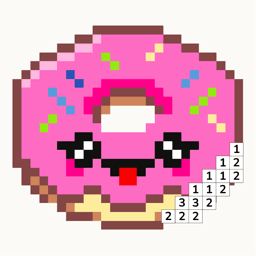
Pixfun vs Color Pop AI: Two Different AI Coloring Apps
Pick Color Pop AI if you want to color freehand — it turns your prompt or photo into a line-art page and hands you the brush. Pick Pixfun if you want structure: a numbered pixel puzzle you solve tap by tap, with streaks, coins, and no timers. Both use AI; they answer different wishes. Pixfun is available now on the App Store and Google Play.
Updated
| Feature | Pixfun | Color Pop AI |
|---|---|---|
| Art type | Color-by-number pixel grid — every pixel numbered, tap to fill | Freehand line-art pages — you pick the colors yourself |
| Library size | 10,000+ curated artworks in 15 categories | Catalog of line-art pages plus everything you generate |
| AI generation | Prompt to colorable pixel puzzle in about a minute, 10 styles | Prompt to line-art drawing for freehand coloring |
| Photo import | Your photo becomes a numbered pixel puzzle | Your photo becomes a line drawing to color |
| Pricing model | Free; Pro at $3.49/week, $7.99/month, or $39.99/year | Free tier; roughly $7.99/week or $39.99–$49.99/year, plus coin purchases |
| Free trial | 3-day trial on weekly, 7-day trial on yearly | Free tier to start; trial terms not clearly published |
| Ads | Some ads on free tier; rewarded ads always optional | Users report heavy ads and frequent premium prompts |
| One-time no-ads purchase | $9.99 removes interstitials and banners forever | None listed — coins and subscriptions instead |
| Calm design | No timers, no move limits; daily streaks and cheering you on | Relaxed freehand coloring, though reviews mention ad interruptions |
| Availability and platforms | iOS and Android — free download | iOS and Android, with years on both stores |
Choose Pixfun if…
- You want a puzzle, not a blank page — every pixel is numbered, so there are no color decisions and no wrong moves.
- You like a gentle game loop: daily streaks, AI credits, coins, and cheering you on.
- You want yearly pricing that stays put — Pixfun Pro is $39.99/year, while Color Pop AI's weekly plan at roughly $7.99 can pass $400 over a year.
- You want your photos turned into numbered pixel puzzles instead of line drawings.
Choose Color Pop AI if…
- You want freehand control — choosing your own colors and filling line art with a brush is the whole point for you.
- You want an established track record — Color Pop AI has years of store reviews behind it, while Pixfun is new and its ratings are still accumulating.
- You prefer illustration-style line art over pixel art — Color Pop AI's output covers broader non-pixel styles.
- You want the backing of MWM, a large French studio with years of shipped apps behind it.
Is Color Pop AI free? Is Pixfun free?
Both are free to download, and both sell upgrades. Color Pop AI has a free tier, then roughly $7.99 per week or $39.99–$49.99 per year, plus coin purchases — and users report heavy ads and frequent premium prompts on the free tier. At the weekly rate, a year can pass $400. Pixfun Pro costs $3.49/week (3-day free trial), $7.99/month, or $39.99/year (7-day free trial), and a one-time $9.99 purchase removes interstitial and banner ads forever. Prices are USD, set by the app stores, and may vary by region.
Which has better AI generation?
They generate different things, so it depends on what you want to color. Color Pop AI turns a text prompt or photo into a line-art page — an outline you color freehand with any colors you like. Pixfun's AI Studio turns a prompt into a complete color-by-number pixel puzzle in about a minute: numbered pixels, a set palette, ready to solve. One generation costs 1 AI credit, with 10 styles from Kawaii to Cyberpunk to Noir, a "Surprise me" dice, and automatic prompt enhancement. Want a page to paint? Color Pop AI. Want a puzzle to solve? Pixfun.
Freehand coloring or color-by-number — what is the real difference?
Color Pop AI hands you line art and a brush: you pick colors, fill regions, and shade however you like. That freedom is the point, and it suits people who enjoy making choices. Pixfun removes the choices on purpose. Every artwork is a pixel grid where each pixel is numbered; you tap to fill, and the picture emerges square by square on an Easy 32×32, Medium 64×64, or Hard 96×96 canvas. No timers, no move limits, no wrong colors. If a blank page relaxes you, pick Color Pop AI. If a numbered path relaxes you, pick Pixfun. No skill. Just calm.
Can I use my AI creations commercially?
Treat both apps as personal-use. Color Pop AI users have publicly asked about sharing and reusing their AI drawings, and per its terms AI content is for personal use only. Pixfun is similar: your AI-generated puzzles are yours to color, save, and share personally, but commercial use needs written permission — the details live at /terms. Neither app is a licensing shortcut for selling AI art. If you just want to color what you imagined, print it, or send it to a friend, both apps cover that comfortably.
Is Pixfun available now?
Yes — Pixfun is available now on the App Store and Google Play, free to download. It's new on the stores, so its ratings are still accumulating, while Color Pop AI has years of reviews behind it from MWM, a large French app studio. Pixfun comes with 10,000+ curated artworks across 15 categories, AI Studio, photo-to-pixel, and daily streaks and cheering you on. Type it. See it in pixels.
Frequently asked questions
Can both apps turn a photo into a coloring page?
Yes, but the results differ. Color Pop AI converts your photo into a line drawing you color freehand. Pixfun converts a camera or library photo into a color-by-number pixel puzzle — from your photo to a puzzle, numbered and ready to tap. Pick by output: a drawing to paint, or a grid to solve.
Which app is cheaper over a year?
On listed prices, Pixfun. Pixfun Pro is $39.99/year with a 7-day free trial, while Color Pop AI's weekly plan at roughly $7.99 adds up to over $400 a year — though its yearly plan ($39.99–$49.99) lands close to Pixfun's. Pixfun also sells a one-time $9.99 "no ads forever" purchase. Prices are USD and may vary by region.
Which app has fewer ads?
Reviews of Color Pop AI frequently mention heavy ads and pushy premium prompts on the free tier. Pixfun's free tier has some ads too, but rewarded ads are always optional, and a one-time $9.99 purchase removes interstitial and banner ads forever. Pixfun Pro removes ads and watermarks as well.
Does Pixfun need an account?
No. Pixfun is anonymous by default — download and start coloring. Optional sign-in with Apple, Google, or email syncs progress, streaks, coins, and levels across devices. It's free to download on the App Store and Google Play.